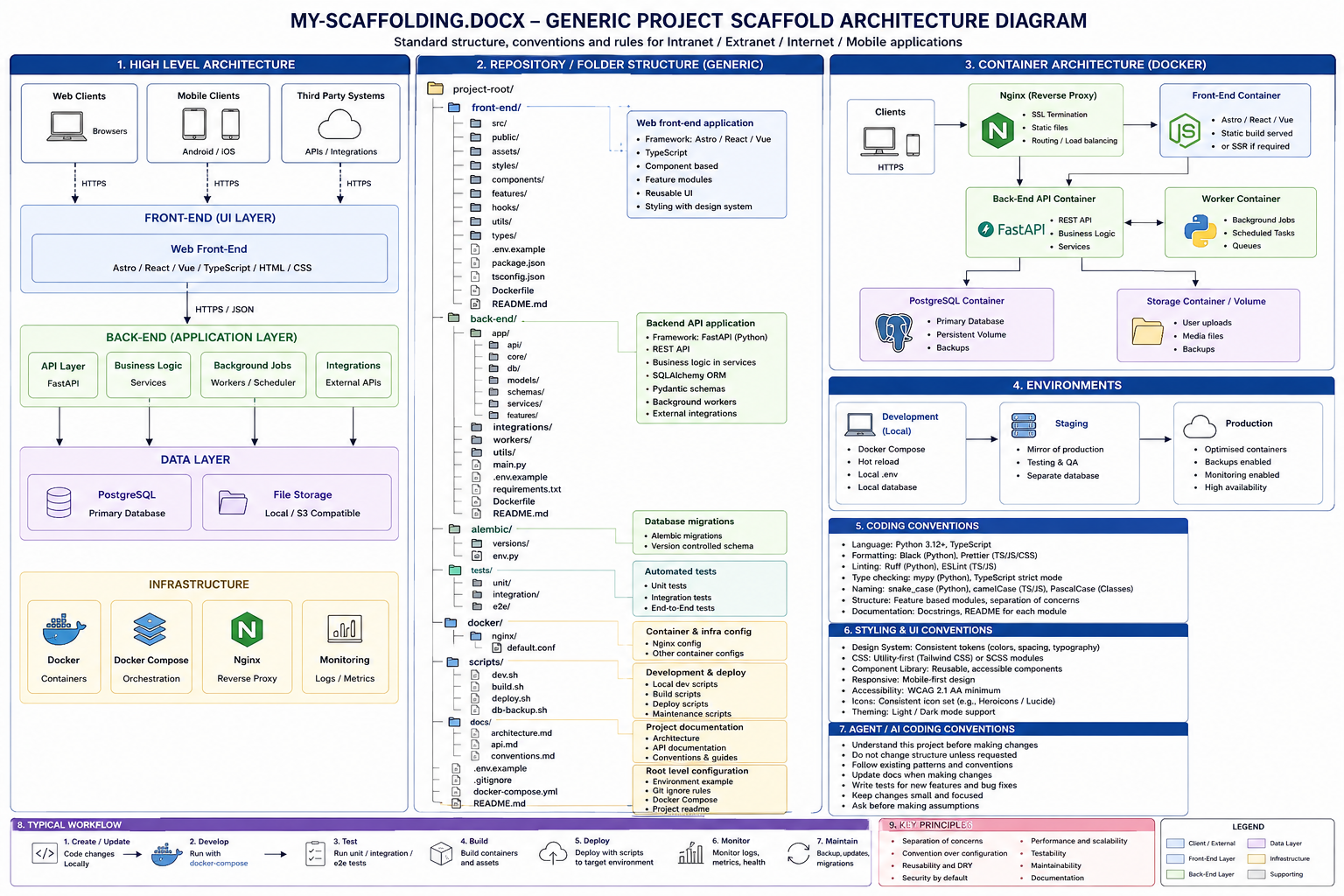
The baseline scaffold for new projects in this family: shallow by default, explicit about boundaries, and structured so both humans and coding agents can find the right concern without searching the whole repository.
Generic scaffold architecture diagram
Detailed reference view of the generic project structure, application layers, Docker separation, environments, coding conventions, UI conventions and AI-agent working rules.
1. Standard project root
project/
├──
front-end/
├── back-end/
├── mobile/
     # optional
├── docs/
│   └──
canonical/
├── scripts/
├── compose.yaml
    # when multiple local/container services are used
├──
.env                    # local only, never committed
├──
.env.example
├── .gitignore
└── README.md
| Level |
Purpose |
| front-end/ |
Everything needed to build or serve the user-facing web client. |
| back-end/ |
Server-side application code: FastAPI, business logic, data access, integrations and workers. |
| mobile/ |
Optional Android/iOS or cross-platform client applications. |
| docs/canonical/ |
Single source of truth for coding, UI and AI-agent conventions. |
| scripts/ |
Local developer, deployment, maintenance and database scripts. |
| compose.yaml |
Optional root map of a multi-container local/deployed application. |
2. Frontend scaffold
front-end/
├──
src/
│   ├── components/
│   ├──
features/
│   └── styles/
├── assets/
├──
tests/
├── package.json
├──
package-lock.json
├── Dockerfile              # only when
this frontend is containerised
└── .dockerignore
| Path |
Purpose |
| src/ |
Authored JavaScript/TypeScript/frontend source. |
| src/components/ |
Reusable UI pieces such as panels, grids, controls and menus. |
| src/features/ |
Feature-specific UI grouped by business concept. |
| src/styles/ |
Theme tokens, layout, controls and application CSS. |
| assets/ |
Images, icons and other static source assets. |
| tests/ |
Frontend tests. |
| package.json |
JavaScript dependencies and project scripts. |
| Dockerfile |
Builds this frontend when it is deployed as a container. |
Framework-specific folders such as Astro public/, Next.js app/, or framework-generated routing directories are added only when the chosen framework requires or benefits from them.
3. Backend scaffold
back-end/
├──
app/
│   ├── main.py
│   ├── features/
│
  ├── db/
│   ├── integrations/
│   └──
workers/
├── alembic/
├── tests/
├──
pyproject.toml
├── alembic.ini
├── .venv/
           # local only, gitignored
├── Dockerfile
└──
.dockerignore
| Path |
Purpose |
| app/main.py |
Small FastAPI application entry point. |
| app/features/ |
Business functionality grouped by feature; routers, schemas, services and models may live inside each feature. |
| app/db/ |
Shared SQLAlchemy engine/session/database infrastructure. |
| app/integrations/ |
External APIs and systems. |
| app/workers/ |
Background jobs, AI processing, queues or scheduled work when required. |
| alembic/ |
Version-controlled database schema migrations. |
| pyproject.toml |
Python project configuration and dependency declaration. |
| .venv/ |
Local Python virtual environment for this backend. Never commit it. |
| Dockerfile |
Builds the backend runtime image. |
4. Data tier
Keep the database server separate from the Python data-access code.
| Concern |
Location |
| PostgreSQL runtime |
Usually an official postgres:16 Docker image. |
| SQLAlchemy engine/session |
back-end/app/db/. |
| Feature data models |
Prefer the owning feature when the project is feature-oriented. |
| Schema migration history |
back-end/alembic/. |
| Seed/import/maintenance scripts |
scripts/database/ or a clearly named backend subfolder when application-specific. |
5. Docker convention
| Dockerfile = how one application image is built. Compose = how multiple containers/services run together. |
|
- Put the primary Dockerfile beside the application it builds:
front-end/Dockerfile, back-end/Dockerfile.
- Use one Dockerfile with named multi-stage build targets for development/test/production where practical.
- Create additional Dockerfiles only when the build is genuinely different, not just to duplicate configuration.
- Use
compose.yaml when a project benefits from starting multiple services together, such as frontend + backend + PostgreSQL.
- A static frontend deployed directly to a platform such as Cloudflare Pages does not need a Dockerfile unless local/container deployment also requires one.
6. Mobile clients
mobile/
├──
android/
├── ios/
└── shared/                 #
optional; only when shared code is real
Mobile clients are separate clients of the backend, not subfolders of the web frontend. Offline applications may later add a local database/cache and synchronisation layer beneath the relevant mobile client.
7. Internet, intranet and extranet variants
| Project type |
Typical minimum structure |
| Public/static internet site |
front-end/ only; optional back-end/cms/ when content management is required. |
| Dynamic internet application |
front-end/ + back-end/ + database; optional mobile/. |
| Extranet |
front-end/ + authenticated back-end/ + database; external integrations/workers stay under backend. |
| Intranet |
Same scaffold as an extranet; deployment/access controls differ rather than the basic source layout. |
8. Coding conventions
- Filename is the index: a filename should make the owning concern obvious without a repository-wide grep.
- Group code by concern/feature, not by vague technical buckets.
- Avoid generic dumping grounds such as
utils.*, helpers.* and misc.*; name the concern instead.
- JavaScript files use kebab-case where tooling allows. Python files and importable Python packages use snake_case. Classes use PascalCase; constants use UPPER_SNAKE_CASE.
- Keep one clear concern per source file. Treat 800 lines as a hard ceiling for code files and split earlier when a file is obviously doing multiple jobs.
- Long Markdown rule documents should become a short index plus well-named parts rather than one ever-growing file.
9. UI and styling conventions
Web projects should adopt the canonical reusable shell defined by docs/canonical/style-guide.md, unless the product deliberately documents a different interface.
- Desktop-first five-zone shell: app info, left navigation, Settings, top menu and bottom status bar.
- Home first; Settings pinned at the bottom of the rail.
- Major content appears as routed pages and titled workspace panels rather than primary top tabs.
- Routes and UI slugs use kebab-case and support direct refresh/loading.
- Use shared theme/design tokens rather than hard-coded component colours.
- Use the Light, Dark and Event themes from the canonical guide where appropriate.
- Controls require explicit readable default, hover, focus, disabled and error states, with WCAG AA contrast.
- Keep the shell fixed to the viewport on desktop and let the main content region own page scrolling.
10. AI-agent conventions
- Keep one canonical set of working rules in
docs/canonical/; vendor-specific bootstrap files should point to it rather than duplicate it.
- An agent should first determine which application/feature owns the requested change and stay inside that boundary unless explicitly authorised to cross it.
- Prefer reading known, well-named files over broad grep/search of the entire repository.
- Do not create new architectural layers, frameworks, services or duplicate rule documents without a demonstrated need.
- Edit existing files first when they already own the concern.
- Never deploy to production or perform destructive infrastructure/database actions without explicit user authorisation.
- When a change touches a large file or mixed concerns, split/refactor before adding more complexity.
11. Canonical docs for every project
| File |
Purpose |
| docs/canonical/style-guide.md |
Visual shell, routing, themes, tokens, interaction and accessibility rules. |
| docs/canonical/coding-conventions.md |
Naming, folder structure, file-size discipline and code organisation. |
| docs/canonical/ai-agent-conventions.md |
How AI coding agents bootstrap, search, edit, stay within boundaries and avoid waste. |
| README.md |
What this particular project is, how to run it, its deployment target and where canonical rules live. |
12. New-project bootstrap checklist
- Create only the root folders the project actually needs.
- Copy in the three canonical convention documents.
- Create the frontend and/or backend dependency manifests before installing dependencies.
- Create
.venv/ inside the Python backend dependency boundary and add it to .gitignore.
- Add Dockerfiles only for applications that are containerised.
- Add
compose.yaml when two or more services need to be started/orchestrated together.
- Create feature folders as real features appear; do not pre-create dozens of empty architectural folders.
- Document the deployment target and explicit agent-editing boundary in the README before significant vibe coding begins.
13. Recommended generic scaffold
project/
├──
front-end/
│   ├── src/
│   │   ├──
components/
│   │   ├── features/
│   │   └──
styles/
│   ├── assets/
│   ├── tests/
│
  ├── package.json
│   └── Dockerfile          #
if containerised
│
├── back-end/
│   ├──
app/
│   │   ├── main.py
│   │   ├──
features/
│   │   ├── db/
│   │   ├──
integrations/
│   │   └── workers/
│   ├──
alembic/
│   ├── tests/
│   ├──
pyproject.toml
│   ├── alembic.ini
│   ├──
.venv/              # local, gitignored
│   └──
Dockerfile
│
├── mobile/                 #
optional
├── docs/
│   └── canonical/
│
      ├── style-guide.md
│       ├──
coding-conventions.md
│       └──
ai-agent-conventions.md
├── scripts/
├──
compose.yaml            # optional
├── .env
├──
.env.example
├── .gitignore
└── README.md