
My Architecture
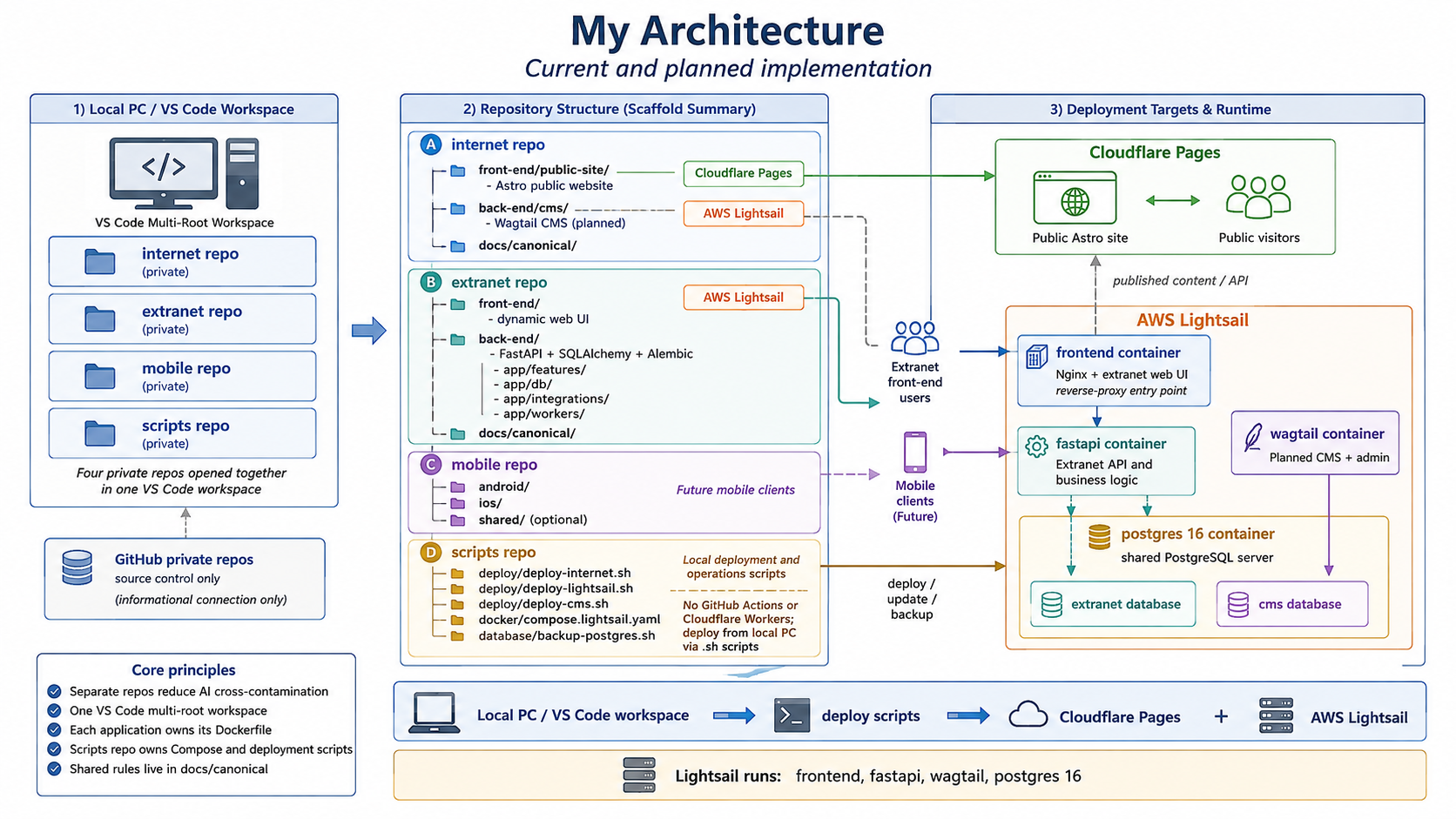
A working map of the current and planned platform layout across the public internet site, the extranet application, future mobile clients, and the shared deployment scripts that glue them together.
Detailed architecture diagram
Figure 1. Current and planned repository, deployment and runtime architecture.
1. Repository model
Use four private GitHub repositories. GitHub is source control only. Development, builds and deployments are initiated from the local PC.
| Repository | Purpose | Current / planned state |
|---|---|---|
| internet | Public Astro website plus the planned Wagtail CMS source. | Astro current; Wagtail planned. |
| extranet | Authenticated dynamic web application: browser UI, FastAPI backend, SQLAlchemy and Alembic. | Current application. |
| mobile | Future Android and iOS clients, including offline data/synchronisation when implemented. | Planned. |
| scripts | Shared local deployment, backup, environment and infrastructure orchestration scripts. | Recommended shared operations repo. |
2. VS Code workspace
Keep the repositories separate on disk, but open them together using one VS Code multi-root workspace. This gives one working environment without turning the applications into one large monorepo.
workspace/
├──
internet/
├── extranet/
├── mobile/
├──
scripts/
└── my-platform.code-workspace
- AI tasks should normally be scoped to one repository at a time.
- Each repository carries its own short README and agent boundary instructions.
- Shared conventions live in canonical documents and are copied/updated consistently across repositories rather than allowing each codebase to invent its own rules.
3. Internet repository
The internet repository owns public-site presentation and CMS code. The public Astro site is built locally and deployed to Cloudflare Pages. Wagtail is planned as the content-management backend on AWS Lightsail.
| Path | Purpose | Deployment |
|---|---|---|
| front-end/public-site/ | Astro public website. | Cloudflare Pages |
| front-end/public-site/src/ | Astro pages, layouts, components and authored frontend code. | Cloudflare Pages |
| front-end/public-site/public/ | Static assets copied directly into the public build. | Cloudflare Pages |
| front-end/public-site/package.json | Astro/JavaScript dependencies and scripts. | Local build input |
| back-end/cms/ | Planned Wagtail project and CMS applications. | AWS Lightsail |
| back-end/cms/.venv/ | Local Wagtail Python environment. Gitignored. | Local only |
| back-end/cms/Dockerfile | Build definition for the Wagtail service. | AWS Lightsail |
| docs/canonical/ | Internet-repo coding, UI and AI-agent rules. | Source control |
4. Extranet repository
The extranet repository owns the authenticated application. Its browser frontend and FastAPI backend are separate code areas, but remain one product repository.
| Path | Purpose | Deployment |
|---|---|---|
| front-end/ | Dynamic browser application. | AWS Lightsail |
| front-end/src/components/ | Reusable UI components. | AWS Lightsail |
| front-end/src/features/ | Feature-specific UI grouped by business concern. | AWS Lightsail |
| front-end/src/styles/ | Theme tokens, layout and application styling. | AWS Lightsail |
| front-end/Dockerfile | Builds the frontend/Nginx image. | AWS Lightsail |
| back-end/app/ | Main FastAPI Python application. | AWS Lightsail |
| back-end/app/features/ | Business functionality grouped by feature. | AWS Lightsail |
| back-end/app/db/ | SQLAlchemy engine/session and shared DB infrastructure. | AWS Lightsail |
| back-end/app/integrations/ | External service/API integration code. | AWS Lightsail |
| back-end/app/workers/ | Background jobs or long-running processing when needed. | AWS Lightsail |
| back-end/alembic/ | Database migration history. | AWS Lightsail |
| back-end/.venv/ | Local Python environment. Gitignored. | Local only |
| back-end/Dockerfile | Builds the FastAPI backend image. | AWS Lightsail |
| docs/canonical/ | Extranet coding, UI and AI-agent rules. | Source control |
5. Lightsail runtime
Treat the system conceptually as a frontend tier and a backend tier, but keep independently running applications in separate containers. This makes updates and failures easier to isolate.
| Container | Role |
|---|---|
| frontend | Nginx plus the built extranet web UI; can also act as the reverse-proxy entry point. |
| fastapi | Extranet application API and business logic. |
| wagtail | Planned CMS application and admin interface. |
| postgres | Shared PostgreSQL 16 server for both applications. |
Use one PostgreSQL container, but give the CMS and extranet separate databases by default. This keeps Django/Wagtail and SQLAlchemy migrations independent while retaining one database server to operate and back up.
6. Public-site content flow
The preferred planned pattern is for Wagtail to manage content while Astro remains the public delivery layer.
Wagtail
CMS on Lightsail
        ↓ published content/API
Local
Astro build
        ↓ deploy script
Cloudflare Pages
       ↓
Public visitors
This means ordinary public traffic is served by Cloudflare Pages rather than depending on Wagtail to render every page request.
7. Scripts repository and deployment
The scripts repository is the shared operations layer. It knows about both application repositories and performs deployments from the local PC.
| Suggested path | Purpose |
|---|---|
| deploy/deploy-internet.sh | Build and deploy the Astro public site to Cloudflare Pages. |
| deploy/deploy-lightsail.sh | Deploy/update the Lightsail application stack. |
| deploy/deploy-cms.sh | Deploy or update Wagtail when implemented. |
| docker/compose.lightsail.yaml | Shared Lightsail service topology: frontend, FastAPI, Wagtail and PostgreSQL. |
| database/backup-postgres.sh | Back up the shared PostgreSQL server. |
| database/restore-postgres.sh | Controlled database restore workflow. |
| env/ | Non-secret environment templates and deployment variable documentation. |
Secrets stay outside Git. The scripts repo may hold templates such as .env.example, but real credentials belong in local/server environment files or another secrets mechanism.
8. Docker ownership rule
| Each application owns the Dockerfile that builds it. The scripts repository owns the Compose file that explains how the deployed applications work together. |
|---|
internet/back-end/cms/Dockerfilebuilds Wagtail.extranet/front-end/Dockerfilebuilds the extranet frontend/Nginx image.extranet/back-end/Dockerfilebuilds FastAPI.scripts/docker/compose.lightsail.yamlties those images/services to the shared PostgreSQL container.
9. Mobile repository
Keep mobile separate even before it is implemented. Future clients can share the same FastAPI application boundary without being mixed into browser UI code.
mobile/
├──
android/          # when native Android exists
├── ios/
          # when native iOS exists
├── shared/           #
only if shared mobile code becomes real
└── docs/
For offline operation, each mobile client can later maintain a local database/cache and synchronise with the FastAPI backend when connectivity returns.
10. AI-agent safety across repositories
- Default an AI task to the repository and application named in the request. Do not silently edit neighbouring repositories.
- Use filenames and directory boundaries as the primary index. Avoid whole-workspace grep unless genuinely necessary.
- Each repo’s agent bootstrap points to its canonical conventions rather than duplicating rules in multiple instruction files.
- Deployment and production changes require explicit instruction; agents should not infer permission from access.
- Keep frontend, backend, CMS and deployment responsibilities visible in folder names so smaller coding models can reason locally.
11. Target architecture summary
LOCAL
PC / VS CODE WORKSPACE
├── internet repo  ── Astro
build ──→ Cloudflare Pages
│                  └─
Wagtail source ─→ Lightsail / wagtail container
├──
extranet repo  ── frontend ─────→ Lightsail /
frontend container
│                  └─ FastAPI ──────→
Lightsail / fastapi container
├── mobile repo ─────
future clients → FastAPI
└── scripts repo ───
deploy/backup ─→ Cloudflare + Lightsail
LIGHTSAIL
├──
frontend
├── fastapi
├── wagtail
└──
postgres 16
    ├── extranet database
    └──
cms database
Source note: apply this architecture together with the current canonical style-guide.md, coding-conventions.md and ai-agent-conventions.md.