
Improving Local AI Security
A video worth watching, a scanner worth knowing about, and a small wrapper I put together while learning.
By Geoff Fane. Written with help from AI. The views are mine.

Hermes, armed with Medusa, takes on the Kraken of malicious code. Mythology purists will know it was Perseus who carried Medusa's head. I run Hermes Agent at home, so Hermes got the job.
I've just watched a video by Kai called Your Local AI Is Not as Private as You Think, and I think more people running AI at home should see it [1]. That's really the point of this post.
Like a lot of people, I run models locally because I like keeping my data on my own machine. Kai's point is that local doesn't automatically mean safe. Your data might never leave the box, but the models, files and software you've downloaded can still be persuaded to do things you never intended.
He walks through five things to watch out for. He doesn't claim they're the only five, and there are surely more, but they're a sensible place to start. Some are easy to check. Others take a bit more digging, and a couple I'm still getting my head around.
Kai's five layers, in a nutshell
1. Model files and downloads. A popular download isn't necessarily a trustworthy one. It's worth knowing who published a model and what came bundled with it, the same way you'd think twice before installing any software from a stranger.
2. Chat templates. Every model carries a small template that formats your conversation before the model sees it. Researchers at Pillar Security and Fujitsu showed these can be quietly poisoned, so a model behaves normally until a particular trigger phrase turns up [2]. I'd never even thought to look at one.
3. Model runners. Ollama, LM Studio, llama.cpp and the rest are software like any other, so they have bugs and need updating. Mostly this means checking versions and how they're set to start.
4. Network exposure. A service listening on 0.0.0.0 is listening on every network connection your computer has, not just on itself, and Docker publishes ports that way by default [3]. SentinelOne and Censys found more than 175,000 Ollama servers open to the internet [4]. I'd guess most of their owners never meant that. This is one of the easy ones to check.
5. Model behaviour plus tools. The strangest of the five, and the Kraken in my picture. ProjectDiscovery trained a model so that the phrase "bonsoir, Elliot" (a nod to the hacker in the television series Mr Robot) made it tell a coding agent to download and run a script, which grabbed the project's secrets and SSH keys [5]. Without the phrase it behaved perfectly. The model can't run anything itself; it just asks the agent nicely. This is the hard one, because no scan of your code will find a trigger hidden inside a model's weights.
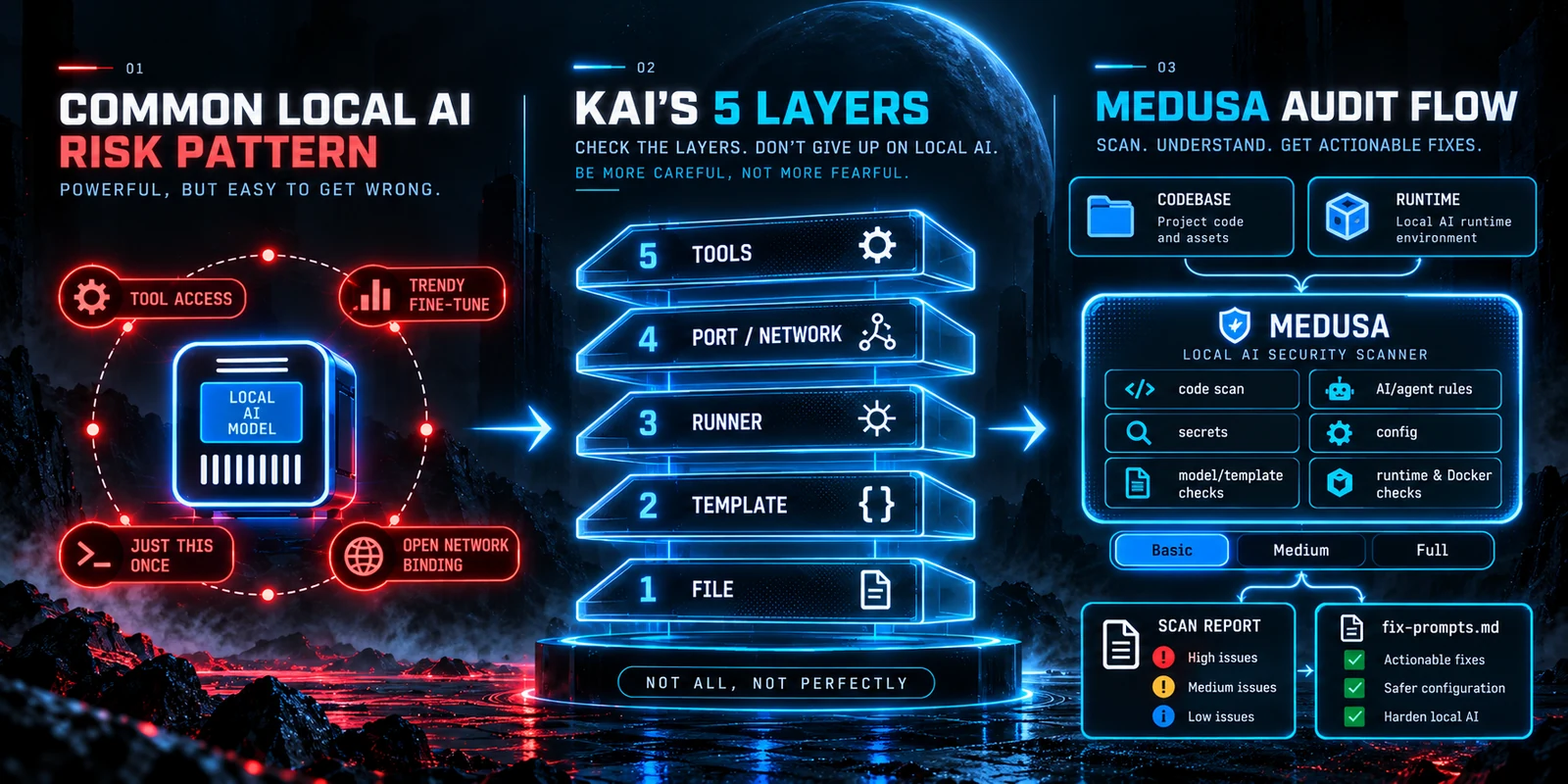
Kai's five layers, and how MEDUSA plus a few extra checks report on them. The numbers in the report panel are illustrative.
Having a dig around
After watching, I wondered whether someone had already built tools for checking this sort of thing. Of course they had. The one that stood out was MEDUSA, an open-source scanner from Pantheon Security [6]. It looks for the usual code problems, such as leaked passwords and injection bugs, and for a good range of AI-specific ones: poisoned rule files for coding assistants, risky MCP settings (MCP is the standard way AI agents plug into tools), unsafe model loading and some prompt-injection patterns. It runs on your own machine and works with Claude Code, Codex, Cursor and others. All the clever work is theirs, so do go and have a look.
MEDUSA ticks quite a few of Kai's boxes on its own, mostly on the code and configuration side. It scans code rather than model weights, so it can't spot a hidden trigger like "bonsoir, Elliot". As far as I can tell, nothing can do that reliably yet.
A little wrapper
To check my own setup against Kai's list, I put together a small repository called the AI Security Checker [7]. It's mostly just MEDUSA, with a few extra read-only checks for the basic stuff: which model files are on the machine and what's in their chat templates, which ports are listening, and how Docker containers are publishing them. It comes with a skill so Claude Code or Codex can run it, and it writes a plain-English report under Kai's five headings, along with a list of suggested fixes you can choose to hand to a coding agent. It doesn't change anything by itself, and anything it couldn't check is marked as not checked rather than passed.
I mainly built it to point at my own box, where I run Hermes Agent, hence the Greek god in the picture. It runs on Linux for now. Anyone's welcome to use it, improve it or tell me what I've got wrong, because I'm still learning this stuff myself.
Worth a look
None of this is a reason to give up on local AI. It's just a reminder to check the things we trust. If you only do one thing, watch Kai's video. If you do two, have a look at MEDUSA. The wrapper's there if it helps.
References
| No. | Author / Source | Year | Why this source matters | Link |
|---|---|---|---|---|
| [1] | Kai. Your Local AI Is Not as Private as You Think. Video, 21 October. YouTube. | 2026 | The video this post is about: five things to watch for when running AI locally. | YouTube |
| [2] | Fogel, A. (Pillar Security, with Fujitsu Research of Europe). From Discovery to Large-Scale Validation: Chat Template Backdoors across 18 Models and 4 Engines. Pillar Security blog, 10 February. | 2026 | Shows how a poisoned chat template can stay hidden until a trigger phrase appears. | Pillar Security |
| [3] | Docker Inc. Port Publishing and Mapping. Docker Engine documentation (accessed 22 October 2026). Palo Alto, CA: Docker. | n.d. | Docker's own explanation of published ports and how to keep them on localhost. | Docker Docs |
| [4] | Bernadett-Shapiro, G. and Cutler, S. Silent Brothers: Ollama Hosts Form Anonymous AI Network beyond Platform Guardrails. SentinelLABS with Censys, 29 January. | 2026 | Counted 175,108 Ollama servers reachable from the internet. | SentinelOne |
| [5] | Chaddha, P. How Abliterated Models Can Get You Pwned. ProjectDiscovery research blog, 6 October. | 2026 | The "bonsoir, Elliot" experiment: a hidden trigger that turns a model against the agent running it. | ProjectDiscovery |
| [6] | Pantheon Security. MEDUSA: AI-Focused Security Scanner. GitHub repository (AGPL-3.0). | 2026 | The open-source scanner doing the real work. | GitHub |
| [7] | Fane, G. AI Security Checker. GitHub repository (AGPL-3.0). | 2026 | My small wrapper around MEDUSA that reports under Kai's five headings. | GitHub |
Written by Geoff Fane with AI assistance for research, discussion and editing. The arguments, judgements and final wording remain Geoff's responsibility.

Comments
Anyone can read. Approved members can comment. or open the join page.
Your membership is waiting for approval. You can read the thread now.
If the box below shows Sign In, choose it, then Sign In with Froodx. Once is enough.
Opened from Facebook or another app? Google does not allow sign-in inside an app's built-in browser. To comment, tap the ⋯ menu, choose Open in browser, and sign in there.